Simplify Your Android App Unit Testing with Easy Tips
Published on: 31 March 2023

Unit testing is a critical aspect of Android app development that can help you find bugs early, boost code quality, and make it simpler to refactor your code. However, it's understandable to feel intimidated by the process, especially if you're new to it.
In this blog post, I'll share some tips and common practices to make unit testing easy for your Android app.
Why Unit Testing is needed
By testing individual units of code, such as methods, classes, and components, you can catch bugs early on and simplify the process of refactoring your code. Unit tests are typically small and have a fast execution time, making them an efficient way to verify the logic of your code.
There are several popular unit testing libraries used in Android development, including Junit, Mockito, Mockk, and Roboelectric. These tools help you write and run tests within the JVM environment, making it easier to isolate and test specific units of code.
Project For Test
MVVM+Clear Architecture with Android Databinding.
We'll be using a sample project built using the MVVM+Clear architecture with the Android Databinding feature. This architecture separates your app into three distinct layers — the presentation layer (View and ViewModel), the domain layer (UseCase), and the data layer (Repository, Room Database, and Retrofit).
Components that can be tested individually are
- ViewModel
- Retrofit Repository
- Room Database
- Domain Layer
Setting up for Unit Testing
Before you begin writing unit tests for your Android app, you must set up your testing framework. Here are the steps you can follow to ensure a smooth testing experience.
Install JUnit and AndroidX test libraries. These libraries provide the necessary tools to write and run unit tests within the JVM environment.
testImplementation 'junit:junit:4.13.2'
testImplementation group: 'org.slf4j', name: 'slf4j-simple', version: '2.0.6'
testImplementation "androidx.test.ext:junit-ktx:1.1.5"
testImplementation "androidx.arch.core:core-testing:2.2.0"
Here I am using Mockk over Mockito as our preferred testing library, which provides first-class support for Kotlin features and coroutine support by default.
We'll also be using Roboelectric, which allows you to write unit tests and run them on a desktop JVM while still using Android APIs like testing with Room Database.
testImplementation "io.mockk:mockk:1.13.4"
testImplementation "org.robolectric:robolectric:4.9.2"
To make your assertions more readable and fluent, I recommend using Google Truth for Java and Android. This library provides a simple and expressive API for writing assertions, making it easier to understand.
 testImplementation "androidx.test.ext:truth:1.5.0"
 // truth assertion
 testImplementation "com.google.truth:truth:1.1.3"
You'll also need to install any libraries related to Retrofit, Coroutine, and Room, depending on the specific components you'll be testing.
// for retrofit
testImplementation 'com.squareup.okhttp3:mockwebserver:4.9.0'
// for coroutine
testImplementation "org.jetbrains.kotlinx:kotlinx-coroutines-test:1.7.0-Beta"

// optional - Room Test helpers
testImplementation "androidx.room:room-testing:2.5.0"
With your testing framework set up, you can now create your first unit test. In the android studio, open any Kotlin file of your project and press ctrl+shift+t , a prompt will appear like

Select Create New Test and choose the methods you want to test.
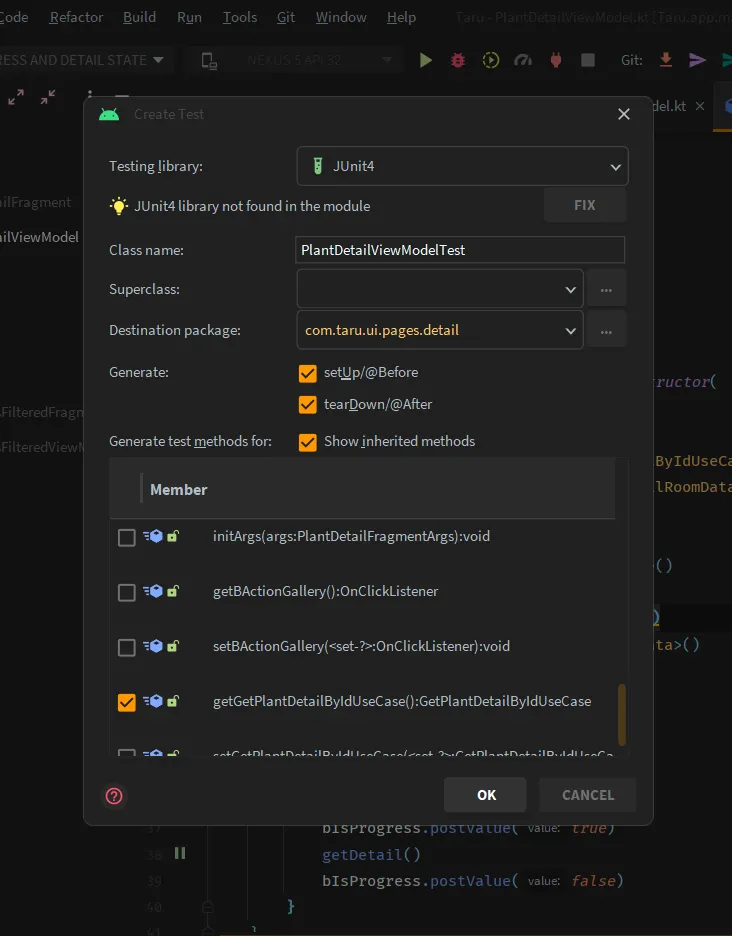
In the next step select ../app/src/test/java/..Local unit test folder.
That's it, You're now ready to start writing test cases for your Android app!
Let's write Unit Tests
Unit test run on JVM means you don't need the android device for this. Before writing let's understand some of the common patterns in the test file.
Annotations
some of the common annotations used in this guide
@MockKcreate a dummy object needed by the class to be tested to function properly. It must be initialized in the@Beforemethod.@Beforeused to execute statements such as preconditions before each test case.@Afterused to execute statements after each test case.@RunWithused at the class level to specify the runner to execute tests in that class, such as AndroidJUnit4 or RobolectricTestRunner.@Testindicates that the method to which it is attached can be executed as a test case
Common Methods
In this guide, you'll encounter several commonly used methods and blocks for unit testing
every{ }andcoEvery{ }: part of Mockk and used for function call stubbing on the mocked object.coEvery { }is used for coroutines.verify{ }andcoVerify{ }: part of Mockk, used for verifying the method call of the mocked object.coVerify { }is used for coroutines.assertThat: part of Google Truth. Truth makes yourtest assertionsand failure messages more readable.
Part 1: Testing Retrofit API Service
To test the Retrofit API Service, we have already added a dependency of MockWebServer which we will use now.
Let's take a look at one Api Source file. We will create a unit testing file for this.
class RemoteWeatherSource @Inject constructor(
    var apiWeather: ApiWeather
){

    suspend fun  getCurrent(lat: Float, lon: Float) = withContext(Dispatchers.IO) {
        return@withContext handleApi { apiWeather.getCurrent(lat, lon) }
    }
}
Here ApiWeather is Retrofit Interface that is used to get current weather according to the location provided.
interface ApiWeather {

    @GET("weather")
    suspend fun getCurrent( @Query("lat") lat: Float,  @Query("lon") lon: Float,
                            @Query("appid") appId: String = BuildConfig.WEATHER_KEY
    ): Response<WeatherCurrentDto>

// ...
}
To test this we need to create the MockWebServer instance and use it with Retrofit to get the expected results. Here we set the response data to the webserver to be returned on method calls.
Create a Test file for RemoteWeatherSource and configure the MockWebServer on the @before function.
class RemoteWeatherSourceTest {

    lateinit var apiWeather: ApiWeather
    private lateinit var mockWebServer: MockWebServer

    @Before
    fun setUp() {
        MockKAnnotations.init(this)

        mockWebServer = MockWebServer()
        mockWebServer.start()
        var baseUrl = mockWebServer.url("/").toString()
        println("MockWebServer url: ${baseUrl}")
        apiWeather = MockRetrofit(baseUrl).retrofit.create(ApiWeather::class.java)
    }

    @After
    fun tearDown()  {
        mockWebServer.shutdown()
    }

// ..
}
Then, we will test getCurrent method of the source by adding the expected response to mockWebServer, which should be returned when calling the interface method.
class RemoteWeatherSourceTest {

  // ..

  @Test
  fun getCurrent() =  runTest {

        val currentWeather =
            WeatherCurrentDto(1, WeatherLocationDto(72.1f,22.3f), listOf(WeatherDto(2, "Sunny")),
                WeatherMainDto(277.15f,10000,2,273.15f, 283.15f),
                12, (System.currentTimeMillis()/1000).toInt()
            )

        val moshi: Moshi = Moshi.Builder().build()
        val jsonAdapter: JsonAdapter<WeatherCurrentDto> = moshi.adapter(WeatherCurrentDto::class.java)
        val json: String = jsonAdapter.toJson(currentWeather)
        val expectedResponse = MockResponse()
            .setResponseCode(HttpURLConnection.HTTP_OK)
            .setBody(json)
        mockWebServer.enqueue(expectedResponse)

        val actualResponse = apiWeather.getCurrent(22f, 72f)
        Truth.assertThat(actualResponse.code()).isEqualTo(HttpURLConnection.HTTP_OK)
        Truth.assertThat(actualResponse.body()).isEqualTo(currentWeather)

  }
  // ..

}
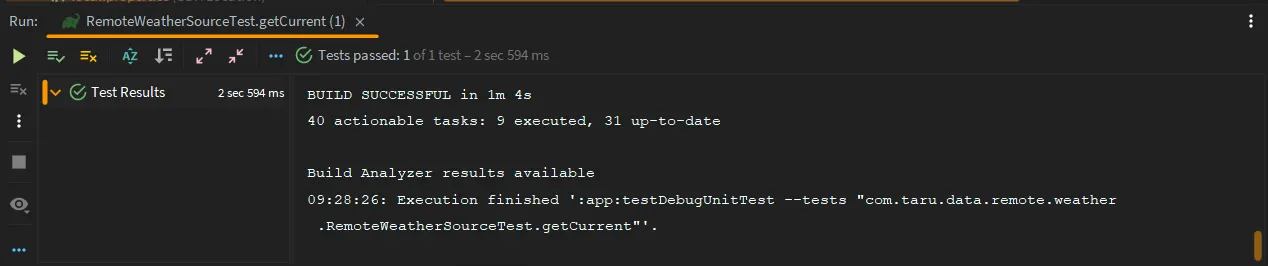
Finally, we will assert the response code and actual response with the expected response. After running this test file, you may see result like this.
Part 2: Testing Room Database with Robolectric
In this part, we will test the Room Database using Robolectric, which allows us to write unit tests for Android APIs.
Let's take a look at Dao Interface. We will create a test file for this.
@Dao
interface CachedRemoteKeyDao: RoomDaoBase<CachedRemoteKeyEntity> {

    @Query("SELECT * FROM CachedRemoteKey WHERE refId=:refId AND refType=:refType AND q=:q LIMIT :limit")
    suspend fun getKey(refId:Int,refType:Int, q:String, limit: Int = 1): List<CachedRemoteKeyEntity>

}
In the test file of CachedRemoteKeyDao we will create an in-memory Room database in the @before function and Annotate the file with @RunWith(
RobolectricTestRunner::class).
@Config(sdk = [Build.VERSION_CODES.P])
@RunWith(
    RobolectricTestRunner::class)
class CachedRemoteKeyDaoTest {
    private lateinit var appDatabase: AppDatabase
    private lateinit var cachedRemoteKeyDao: CachedRemoteKeyDao

    @Rule
    @JvmField
    val instantExecutorRule = InstantTaskExecutorRule()

    @Before
    fun setUp() {
        appDatabase = Room.inMemoryDatabaseBuilder(
            ApplicationProvider.getApplicationContext(),
            AppDatabase::class.java
        )
            .allowMainThreadQueries()
            .build()

        cachedRemoteKeyDao = appDatabase.cachedRemoteKey()

    }

    @After
    fun tearDown() {
        appDatabase.close()
    }
    // ..
}
Next, we will test the getKey method of the DAO interface by inserting entities inside the Room Database that can be queried by the interface method.
@Config(sdk = [Build.VERSION_CODES.P])
@RunWith(
    RobolectricTestRunner::class)
class CachedRemoteKeyDaoTest {

  // ..

  @Test
  fun getKey() = runTest {
    cachedRemoteKeyDao.insert(
        CachedRemoteKeyEntity( refType =  2, refId = 1, q =  "sa", nextKey = 2, prevKey = null, isEndReached = false),
        CachedRemoteKeyEntity( refType =  2, refId = 2, q =  "sa", nextKey = 3, prevKey = null, isEndReached = false),
        CachedRemoteKeyEntity( refType =  2, refId = 3, q =  "sa", nextKey = null, prevKey = null, isEndReached = false),
        CachedRemoteKeyEntity( refType =  2, refId = 4, q =  "sa", nextKey = null, prevKey = null, isEndReached = true))

    // Then
    val value = cachedRemoteKeyDao.getKey(refType = 2, q = "sa", refId = 2)
    Truth.assertThat(value.size).isEqualTo(1)
    Truth.assertThat(value[0].id).isEqualTo(2)

  }

  // ..

}
After testing, if it works then you can see a green tick on the console terminal as shown in Part 1 for Retrofit API testing.
Part 3: Testing Domain Layer
In the Domain Layer, we implement the logic to access remote or local data sources based on the provided use case. Let's take a look at a Domain Repository file.
class DefaultIdentifyRepository  @Inject constructor(
    @ApplicationContext private val context: Context,
    private val remoteIdentifySource: RemoteIdentifySource,
    private val localLogSource: LocalLogSource
): IdentifyRepository {

  // ..

  override suspend fun identify(organ: String, uri: Uri): DomainResult<ModelIdentified> {
        val file  = compressFile(uri)

        val apiResult = remoteIdentifySource.identify(organ, file)
        if(apiResult is ApiResult.Success){
            var calender = Calendar.getInstance()
            localLogSource.insert(IdentifyLogRoomEntity(dt=(calender.time.time/1000L).toInt()))
            return DomainResult.Success(apiResult.data.toDomainModel(uri))
        }else if(apiResult is ApiResult.Exception){
            apiResult.throwable.printStackTrace()
        }else if(apiResult is ApiResult.Message){
            return  DomainResult.Failure(Throwable("${apiResult.message}"))
        }

        return DomainResult.Failure(Throwable("some"))
    }

  suspend fun compressFile(uri: Uri): File {
        val file  = Compress.with(context, uri).concrete {
            withMaxHeight(500f)
            withMaxWidth(500f)
        }.get(Dispatchers.IO)
        return file
    }

  // ..

}
Create a test file for the above repository. In this test, I will use mock objects and Mockk's spyK feature on real objects.
@RunWith(AndroidJUnit4::class)
class DefaultIdentifyRepositoryTest {


    @Rule
    @JvmField
    val instantExecutorRule = InstantTaskExecutorRule()

    lateinit var defaultIdentifyRepository: DefaultIdentifyRepository

    @MockK
    lateinit var context: Context

    @MockK
    lateinit var remoteIdentifySource: RemoteIdentifySource

    @MockK
    lateinit var localLogSource: LocalLogSource


    @Before
    fun setUp() {
        MockKAnnotations.init(this)
        defaultIdentifyRepository = spyk(DefaultIdentifyRepository(context, remoteIdentifySource, localLogSource), recordPrivateCalls = true)
    }
}
Here inside setup, the spy copy object of DefaultIdentifyRepository is used, Let's write a test and use these features.
@RunWith(AndroidJUnit4::class)
class DefaultIdentifyRepositoryTest {
    // ..

    @Test
    fun `identify success`() = runTest{

        coEvery { defaultIdentifyRepository.compressFile(any()) } returns File("check")


        coEvery { localLogSource.insert(any()) } returns 1
        coEvery { remoteIdentifySource.identify( any(), any()) } returns ApiResult.Success(
            PlantIdentifyDto("English", listOf())
        )

        val result = defaultIdentifyRepository.identify("leaf", Uri.parse("file://plant-image.jpg"))

        val expectedResult = ModelIdentified(listOf(),"file://plant-image.jpg")

        // customized assert
        assertThat(result).isEqualTo(DomainResult.Success(expectedResult))

    }
  // ..
}
As you can see I used coEvery { } to stub the real coroutine-based method on the spy object and on the mock objects. Here assertThat is extended from Truth's Subject. Check the implementation Here.
Part 4: ViewModel Unit Testing
In the final part, we will write unit tests for the ViewModel, which is responsible for providing data from the domain layer to the UI using LiveData. The ViewModel also utilizes the DataBinding feature. Let's see ViewModel
@HiltViewModel
internal class PlantDetailViewModel @Inject constructor(

    private val navManager: NavManager,
    var getPlantDetailByIdUseCase: GetPlantDetailByIdUseCase): ViewModelBase() {
    private lateinit var mPlantDetail: PlantDetailRoomData
    private var mPlantId: Int = -1

    var bKeywords = MutableLiveData<List<String>>()

    val bIsProgress = MutableLiveData(false)
    val bData = MutableLiveData<PlantDetailRoomData>()


    fun initArgs(args: PlantDetailFragmentArgs) {
        mPlantId = args.plantId
        viewModelScope.launch {
            bIsProgress.postValue(true)
            getDetail()
            bIsProgress.postValue(false)
        }
    }


    private suspend fun getDetail() {
        if(mPlantId == -1){ return }
        var result = getPlantDetailByIdUseCase.invoke(mPlantId)
        if (result is DomainResult.Success) {
            result.value.let {
                bData.postValue(it)
                bKeywords.postValue(it.detail.natives.take(7))
                mPlantDetail = it
            }
            Log.d("PlantDetailViewModel", "details: ${result.value}")
        }else {
            if(result is DomainResult.Failure){
                result.throwable?.printStackTrace()
            }
        }
    }

    // ..
}
First, create a test file for the ViewModel and initialize the ViewModel instance with mock parameters in the setup function.
@RunWith(AndroidJUnit4::class)
class PlantDetailViewModelTest {

    @Rule
    @JvmField
    val instantExecutorRule = InstantTaskExecutorRule()

    @MockK
    lateinit var navManager: NavManager

    @MockK
    lateinit var getPlantDetailByIdUseCase: GetPlantDetailByIdUseCase

    private lateinit var plantDetailViewModel: PlantDetailViewModel

    @Before
    fun setUp() {

        MockKAnnotations.init(this)
        plantDetailViewModel = PlantDetailViewModel(navManager, getPlantDetailByIdUseCase)

    }
}
Next, let's test the LiveData of plant details and progress. We can use capture(list) to capture the arguments passed to the LiveData observers in the onChanged method.
@RunWith(AndroidJUnit4::class)
class PlantDetailViewModelTest {
    // ..

    @Test
    fun `check progress and detail state`() = runTest {
        val isProgressObserver: Observer<Boolean> = mockk(relaxUnitFun = true)
        plantDetailViewModel.bIsProgress.observeForever(isProgressObserver)

        val dataObserver: Observer<PlantDetailRoomData> = mockk(relaxUnitFun = true)
        plantDetailViewModel.bData.observeForever(dataObserver)

        val plantDetail = PlantDetailRoomData(
            detail = PlantEntity(
                12,
                speciesId = null,
                imageUrl = "",
                vegetable = false,
                commonName = null,
                familyName = null,
                genusName = null,
                scientificName = null,
                speciesName = null,
                edible = null,
                ediblePart = listOf(),
                natives = listOf(),
                lastQueriedDt = (System.currentTimeMillis() / 1000).toInt(),
                growth = null
            ),
            entries = listOf()
        )

        coEvery { getPlantDetailByIdUseCase.invoke(any()) } returns DomainResult.Success(plantDetail)
        plantDetailViewModel.initArgs(PlantDetailFragmentArgs(12))

        val progressList = mutableListOf<Boolean>()
        verify { isProgressObserver.onChanged(capture(progressList)) }

        val dataList = mutableListOf<PlantDetailRoomData>()
        verify { dataObserver.onChanged(capture(dataList)) }

        Truth.assertThat(progressList.size).isEqualTo(3)
        Truth.assertThat(progressList[1]).isEqualTo(true)
        Truth.assertThat(dataList.size).isEqualTo(1)
        Truth.assertThat(dataList[0]).isEqualTo(plantDetail)

        plantDetailViewModel.bData.removeObserver(dataObserver)
        plantDetailViewModel.bIsProgress.removeObserver(isProgressObserver)

    }
}
For testing suspend function we can use runTest from android coroutine test library as shown above. After running the tests, you should see a green tick in the console.
Conclusions
We have explored how to write effective unit tests for a Kotlin-based project using various libraries such as Mockk, Google Truth, and Robolectric. While there are numerous libraries available for unit testing, these particular libraries were chosen due to their ease of use and compatibility with Kotlin.
It's important to note that unit testing is just one aspect of the testing process, and the next step is to write instrumented tests that run on an actual Android device. This will be discussed in an upcoming blog.
Helpful links
- Mockk vs Mockito comparison: Blog By Emmanuel
- Roboelectric: Guidance
- Mockk Basics : Blog By Oleksiy
If you want to see how the concepts discussed in this guide can be applied in a real-life project, you can check out Taru, an open-source app.
GitHub - nirajprakash/taru-plants-android: Android App for plant lovers! Identify plants, check the weather, and discover new favorites. Built using MVVM architecture with local caching using Room SQLite Database. Taru is completely open source! 🌿
Android App for plant lovers! Identify plants, check the weather, and discover new favorites. Built using MVVM architecture with local caching using Room SQLite Database. Taru is completely open so...
GitHub